
win10删除文件刷新才会消失怎么办?
有win10用户遇到了删除文件需要刷新一下才会消失的情况,这种情况怎么办呢?第一种解决办法是打开运行窗口,输入ie4uinit -show,然后回车执行就可以了。第二种方法是重置文件夹,具体步骤为:打开文件夹选项窗口,切换到查看选项卡,然后点击“重置文件夹”按钮即可。第三种方法是新建图标缓存。
win10删除文件刷新才会消失怎么办?
方法一
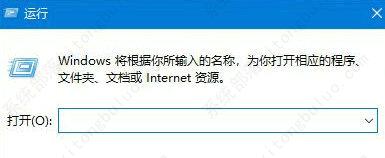
按Win键+R键打开“运行”窗口,输入如下命令后按回车键执行:ie4uinit -show。
方法二
可以尝试一下重置文件夹。我们打开“此电脑”,点击查看选项卡,再点击“选项”,就可以打开“文件夹选项”了。
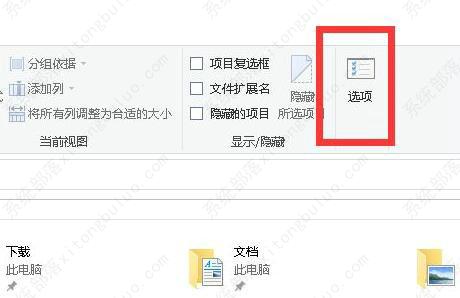
我们在文件夹选项的界面中,我们点击下“查看”选项中,点击“重置文件夹”按钮,选择是“是”。如果应用到文件夹可以点,就点击一。
方法三
重建图标缓存即可解决,将以下代码复制到文本保存为bat格式后双击运行。
em 关闭Windows外壳程序explorer
taskkill /f /im explorer.exe
rem 清理系统图标缓存数据库
attrib -h -s -r “%userprofile%\AppData\Local\IconCache.db”
del /f “%userprofile%\AppData\Local\IconCache.db”
attrib /s /d -h -s -r “%userprofile%\AppData\Local\Microsoft\Windows\Explorer\*”
del /f “%userprofile%\AppData\Local\Microsoft\Windows\Explorer\thumbcache_32.db”
del /f “%userprofile%\AppData\Local\Microsoft\Windows\Explorer\thumbcache_96.db”
del /f “%userprofile%\AppData\Local\Microsoft\Windows\Explorer\thumbcache_102.db”
del /f “%userprofile%\AppData\Local\Microsoft\Windows\Explorer\thumbcache_256.db”
del /f “%userprofile%\AppData\Local\Microsoft\Windows\Explorer\thumbcache_1024.db”
del /f “%userprofile%\AppData\Local\Microsoft\Windows\Explorer\thumbcache_idx.db”
del /f “%userprofile%\AppData\Local\Microsoft\Windows\Explorer\thumbcache_sr.db”
rem 清理 系统托盘记忆的图标
echo y|reg delete “HKEY_CLASSES_ROOT\Local Settings\Software\Microsoft\Windows\CurrentVersion\TrayNotify” /v IconStreams
echo y|reg delete “HKEY_CLASSES_ROOT\Local Settings\Software\Microsoft\Windows\CurrentVersion\TrayNotify” /v PastIconsStream
rem 重启Windows外壳程序explorer
start explorer
相关文章
- 2026 最新 Win10 系统推荐!
- 设置Win10护眼模式颜色为绿色方法
- 干净不带软件的纯净版Win10下载
- Win10系统如何设置默认打印机
- Win10发现不了无线网络的三种解决方法
- 如何切换联想拯救者显卡模式
- 联想Win10改Win7如何设置bios?联想Win10改Win7设置bios的方法
- 戴尔Win10睡眠无法唤醒怎么办?戴尔Win10睡眠无法唤醒解决方法
- 戴尔Win10睡眠后花屏怎么办?戴尔Win10睡眠后花屏解决方法
- 华硕Win10开机自动进入Bios无限循环的解决方法
- Win10更新错误提示0x8007371b怎么办?更新错误0x8007371b的解决方法
- Win10 20H2无法更新最新系统怎么办?Win10 20H2无法更新最新系统的解决方法
- Win10 20H2怎么升级到22H2?Win10 20H2升级到22H2的方法
- Win10系统补丁更新在哪里?Win10更新补丁的教程
- 戴尔Win10忘记开机密码怎么办?戴尔Win10忘记开机密码解决方法
- 华硕Win10怎么开启VT?华硕Win10开启VT模式详细流程